For anyone using Banner, please be advised that there have been recent browser updates that are incompatible with Banner. This is causing errors or general performance issues when loading Banner.
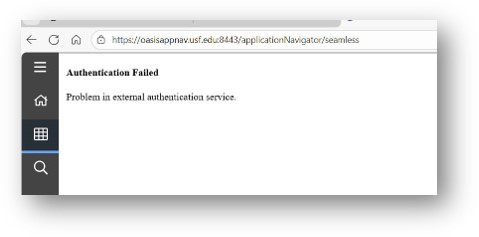 To resolve this issue, please perform the following settings updates if you are trying
to access Banner with Google Chrome or Microsoft Edge.
To resolve this issue, please perform the following settings updates if you are trying
to access Banner with Google Chrome or Microsoft Edge.
Google Chrome Setting Updates
- Disable the 'Local Network Access Checks' setting. To do this within Chrome use the faux URL --> chrome://flags/#local-network-access-check
- Set Local Network Access Checks to 'Disabled'
- Use the Relaunch button in the bottom of the screen.

Microsoft Edge Settings Updates
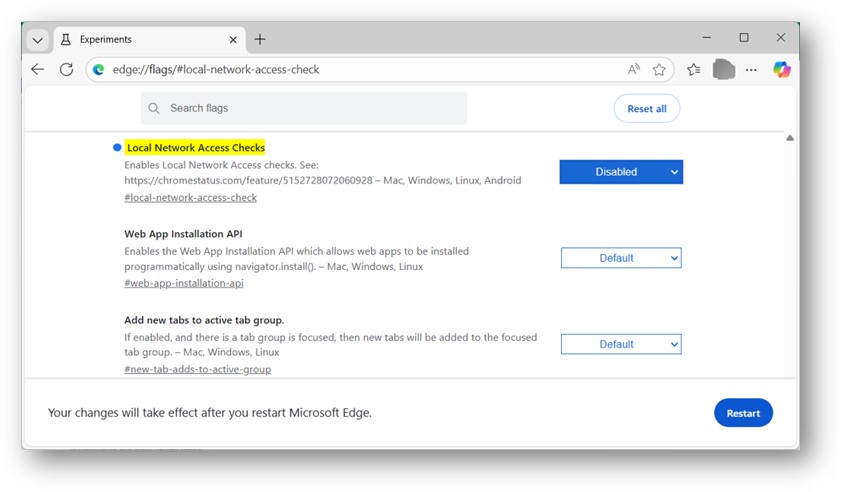
- Disable the 'Local Network Access Checks' setting. To do this within Edge use the faux URL --> edge://flags/#local-network-access-check
- Set Local Network Access Checks to 'Disabled'
- Use the Restart button in the bottom of the screen.
Still having issues? Trying clearing your browser cache.
- Perform a cache clear. Instructions on how to do so can be found on the following website: How to Clear Browser Cache
- Use an incognito window. This can be done in Chrome by clicking the three vertical dots to the right of the search bar and selecting "new incognito window."
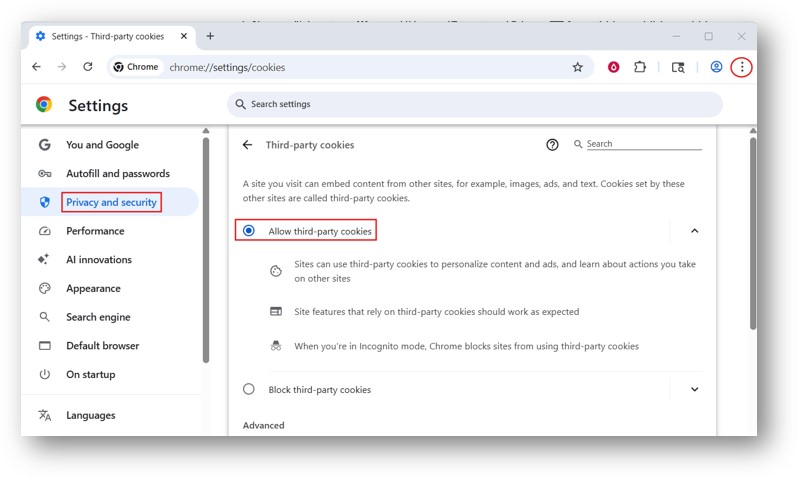
- If the issue persists, please make sure third party cookies are enabled on your device. You can check this on Google Chrome by opening the browser and clicking on the three dots located on the top right of the browser and selecting “Settings.” From there, please select “Privacy and Security” and then “Third-party cookies.” Then verify that “Allow third-party cookies” is selected.
If you're still having issues after trying these steps, please contact IT:
- Chat: https://itchat.usf.edu
- Phone: (813) 974-HELP (4357)
- Submit a Ticket