Welcome to USF and to the USF community! If you’re visiting this page as a new employee, keep reading. We have great resources for your successful start as a new Bull! We appreciate that the initial days of employment are filled with anticipation, excitement and many questions. For that reason, we've assembled some helpful information to get you started. If you'll be relocating to the Tampa Bay area, be sure to check out our "New to Tampa" resource page. We wish you much success in your new role!
Are you a manager looking for onboarding guidance? Check out the Guide for Managers booklet.
POPULAR RESOURCES
The Employee Resource Guide contains introductory information, contacts and web sites for you to learn more about work and life resources, perks and discounts, particular areas of interest and facts about USF.
Bookmark the Benefits website and browse the Benefits Summary to see the many great options for you and your family. Any immediate questions can be sent to benefits@usf.edu.
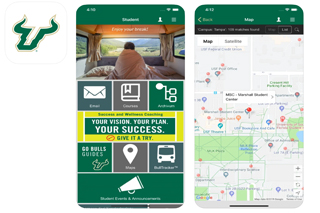
Consider downloading the MyUSF app: MyUSF Mobile provides students, faculty and staff access to key University of South Florida resources wherever you are. Use MyUSF Mobile to access your course details, contact information, finding your way across campus and more.
BEFORE YOU START: STEPS TO TAKE
- Please communicate with your supervisor on where to report on the first day. Confirm
your start date, time, place, commuting options and parking options.
- See parking information for your campus here: Tampa Campus | St. Pete Campus | Sarasota Campus
- Review your benefits options.
- Complete your Preboarding paperwork. Check what hire documentation, including proof of eligibility to work in the United States, you may need for your first day.
PREBOARDING
preboarding is the process that facilitates the completion of new hire paperwork for all new employees. The program is designed to get employees off on the right foot by ensuring that necessary paperwork is completed on or before the employee's first day of employment.
Information for Foreign Nationals
INTERNATIONAL SCHOLARS (J-1)
-
Immigration Check-in is required with the Office of International Services (OIS) for all new J-1 scholars and takes place via Microsoft Teams during regular advising hours. If you have questions, email j1visa@usf.edu.
This check-in MUST take place before completing new hire paperwork. -
Two business days after the Immigration Check-in with OIS, scholars must make an appointment with the local Social Security Administration office to apply for a card (if they do not yet possess a Social Security card). At the SSA appointment, the scholar will receive a receipt letter which will be used, along with all required work authorization documents, to complete their new hire paperwork with Human Resources/RightStart.
INTERNATIONAL STUDENTS (F-1/J-1)
- After arrival in the US, Immigration Check-in is required with the Office of International Services (OIS) for all new international students and takes place via Microsoft Teams. The student attends this Virtual Check in at set times. For process and times go to https://www.usf.edu/world/international-services/before-you-arrive/document-check.aspx . If you have questions, email globullstart@usf.edu. A schedule of check-in times is communicated prior to the start of every semester through iStart.
- Once the student has completed check-in and all immigration documents have been verified, the student must make an appointment with the local Social Security Administration office to apply for a card (if they do not yet possess a Social Security card). At the SSA appointment, the scholar will receive a receipt letter which will be used, along with all required work authorization documents, to complete new hire paperwork with Human Resources/RightStart.
- Please note that students holding a J-1 visa are also required to have a work authorization letter from International Services.
Other Visa Status (TN, H1-B)
- Should have met all work authorization requirements prior to preboarding.
- Must have a receipt letter from the Social Security Administration (or Social Security card), as well as all required documents proving identity and work eligibility.
General Information
- During the preboarding process, new hires will receive emails from RightStart with instructions to complete hire paperwork, as well as a Preboarding Journey in Oracle. These steps are required in order to be added to USF systems and payroll.
- Hires may not begin working until cleared with HR Preboarding team (you will receive a Next Steps email indicating status).
- As soon as an employee receives his/her permanent Social Security card (which should take no more than 90 days) he/she will amend their original I-9 and upload to a secure HR portal provided by RightStart so that record can be updated with the permanent Social Security number.
New Hires to USF
All new employees are required to attend preboarding on or before their first day of employment.
In order to help you through this process, please be prepared to:
- Provide documentation that establishes your employment eligibility to work in the U.S. (in accordance with the Immigration Reform and Control Act of 1986). View the I-9 form that will identify acceptable documents.
- Provide your passport, I-9 form, visa and appropriate immigration support documents based on visa class, if you are a foreign national.
- When you have completed all of your paperwork in HR, you should report as instructed in your offer letter.
Rehires to USF
An employee who left employment with USF for more than one year, is treated as a new hire and must complete new hire paperwork prior to starting work. If an employee has been separated from the university for less than one year, the department may appoint him/her by completing an Appointment Status Form and attaching the signed offer letter. Once the rehiring process is completed and updated in Oracle HR, the employee may access Self Service to update their personal information.
Information about your NetID, email and staff ID card
During your first week, you'll be able to set up a NetID after you have an official USF employee ID number.
- Your USF email will be created automatically after you have set up/activated your NetID.
- You'll be able to get your staff ID card approximately 48 hours after the completion
of your new hire paperwork. If possible, it can be beneficial to complete your paper
work prior to your first day of work.
- The USFCard is the official identification card of the University of South Florida. The USFCard is a multi-functional card with digitized photo and electronic identification and validation for departments needing to verify student and/or employee status. The USFCard was designed as a platform for a multitude of services and functions. For example, many buildings have card-access entry. The USFCard provides access to the USF Library resources. Funds can be placed on the USFCard for use in on-campus vending machines.
- For additional information, including how to get your USFCard, please visit IT's Card Resource page.
Ready to take charge as a new bull?
Visit our Employee Success Center page for new employees for tips on development, community & networking.
ADDITIONAL INFORMATION FOR EACH CAMPUS
Central Human Resources (located on the Tampa campus)
St. Petersburg Campus Human Resources | St. Petersburg campus New Hire Page