Purchasing
Foundation Funds
A full guide to USF Foundation Process and Procedures can be found HERE.
Use of Foundation Funds with BMP Punch out
BEFORE MAKING THE PURCHASE:
- Ensure that the purchase is allowable under USF Purchasing guidelines and that the purchase is allowable under the donor intent of the USF Foundation fund.
- This process MAY ONLY be used with AMAZON PUNCH OUT. Other suppliers capable of receiving a PO should be through BMP using a valid USF Chartfield or be submitted directly to USF Foundation via check request for payment.
- Make sure you have adequate budget in Budget Account 88420
- Submission of a reimbursement request from Foundation is not a guarantee of reimbursement, department should be prepared to move the expense from 12420 back to a valid USF Chartfield if the reimbursement is denied.
PROCEDURE:
- Login to BMP and select the Punch Out supplier you are purchasing from, shop, fill your cart, and bring the cart back to BMP.
- When filling in your chartfield information use either a Convenience (funds starting with 24---,94---,95---, or 96---) or in some cases an Auxiliary Fund (funds starting with 0----) chartfield – in combination with GL 53001.
- When the PO is fully received (all items are shipped and accounted for) complete the
Foundation Check/Wire request for the full amount of the expense (may not match the
PO exactly if shipping charges were added price adjustment made). The request should
have the accompanying documentation:
- A copy of the PO
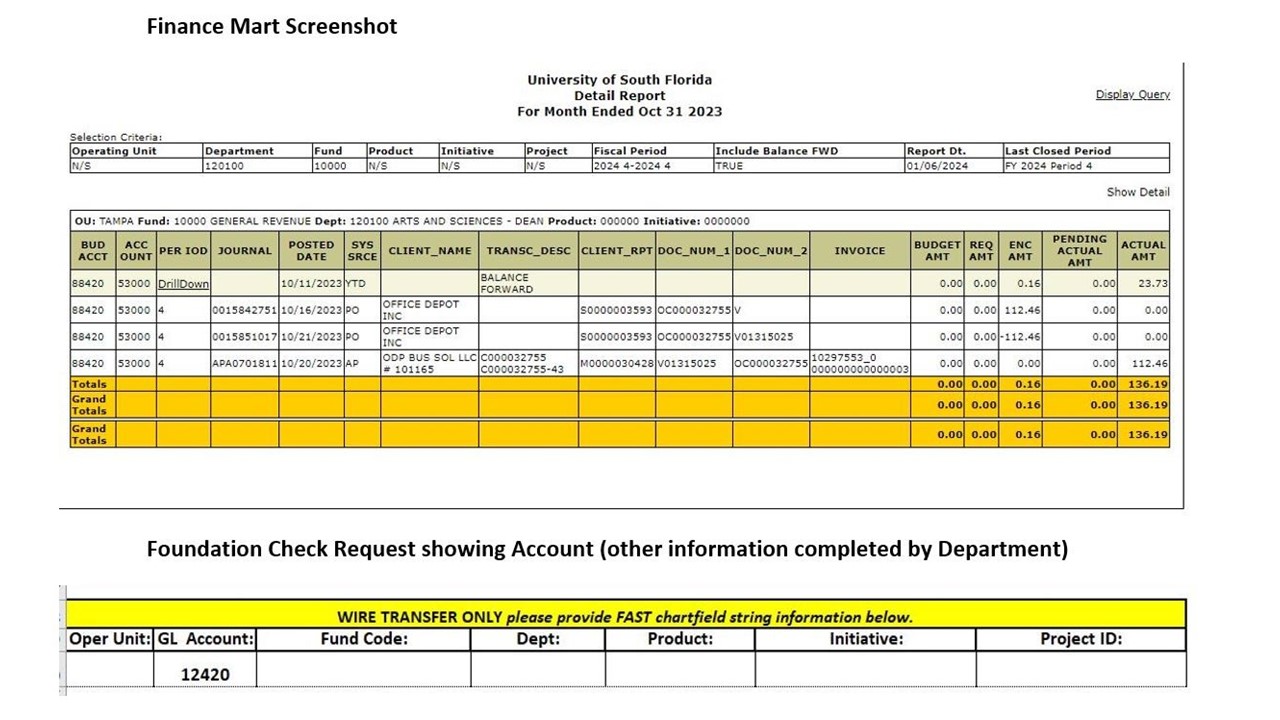
- A screenshot of the charge posted to Finance Mart with the matching PO number.
- Indicate reimbursement to account 12420
See below for help on gathering supporting documentation: