Graduate Research Symposium
Poster Requirements
Graduate students will be responsible for preparing their poster files.
FILE SUBMISSION REQUIREMENTS:
Posters that do not meet the below requirements will not be accepted.
- Printed Poster file must be a 36" x 48" PDF file.
NOTE: ONLY Vertical/Portrait Orientation poster files will be accepted to print. Avoid using a dark-colored background. The background color of your poster should not exceed 50% of the total area. We encourage you to use a balanced color scheme that enhances the content and makes it easily readable. All accepted abstracts may be presented as Print posters.
- Digital Poster file must be a 48" x 36" PDF of your Slide, PNG, JPG or the PPT file itself. (Horizontal/Landscape Orientation) (Oral presenters only)
NOTE: After Abstract submission, you may be notified that you were chosen to be an Oral presenter, you will then need to create a Digital Poster. Only students who are notified should create a Digital poster. If desired, you have the option to participate in the Printed Poster symposium on the same day. Then, submit both 1 Digital Poster file and 1 Printed Poster file, in the correct sizes and orientations.
Watch your email inbox after submission, in case there is a need to correct your file.
Also, only utilize compliant USF logos.
Download poster templates here: Landscape | Portrait
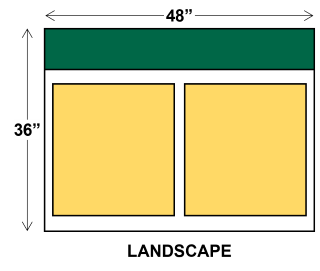
Digital Poster: 1 PPT Slide
(Oral presenters only)
- Orientation: Landscape (Horizontal)
- Width: 48"
- Length: 36"
- Submission type: 48" x 36" PDF of your Slide, PNG, JPG or the PPT file itself.
View Template
Digital Poster Example
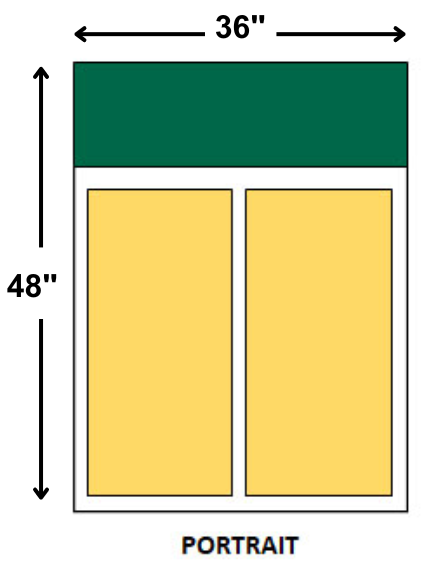
Printed Poster
- Orientation: Portrait (Vertical)
- Width: 36"
- Length: 48"
- Submission type: 36" x 48" PDF file (actual size)
View Template
Printed Poster Example
"Designing Your Research Poster" and "Presenting Your Research Poster" Workshops
Presented by Tracy Costello, Assistant Dean, Postdoctoral Affairs and Graduate Student Success on March 9 and 23, 2026 .